< Previous | Contents | Next >
As already mentioned in the previous chapter the highlighted (or selected) Pattern Slot tells you which Pattern is currently active (and played if the sequencer is running). This is the Pattern you edit on all other screens.
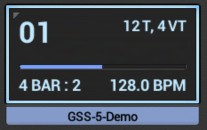
While a Pattern is running, its Pattern Slot provides some additional information.
Shows the pattern play count.
Depending on the Chain-Mode and Song-Mode (+ related data), it counts up or down.
Chain-Mode + active Chain exists | Song-Mode + active Song exists | Pattern play count behavior |
NO | NO | Simply counts (up) the number of (same) pattern cycles. |
NO | YES | Counts down the number of (same) pattern cycles programmed in the active song. |
YES | NO | Counts down the number of (same) pattern cycles programmed in the actve chain. |
YES | YES | Counts down the number of (same) pattern cycles programmed in the actve chain. |
Shows the current Pattern overall playback position.
The length of the Pattern in Bars + the Bar number that is currently played
 Get this Doc as PDF